
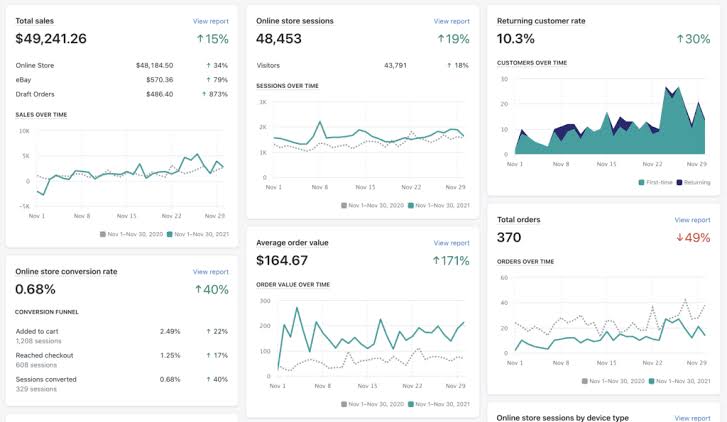
Choosing the best Shopify analytics apps can make a significant difference to an online store’s profitability. The right tools help merchants understand customer behavior, measure marketing performance, identify conversion problems, and determine which products and advertising campaigns generate the most value.
Although Shopify includes built-in reporting, growing stores often need more detailed attribution, customer journey analysis, product analytics, or visual behavior tracking. Paid analytics software can fill these gaps, provided the additional insights justify the subscription cost.
Best Shopify Analytics Apps at a Glance
The ideal solution depends on the store’s size, advertising channels, reporting requirements, and available budget. Some platforms specialize in marketing attribution, while others focus on customer behavior, financial reporting, or the performance of the shopping experience.
1. Triple Whale
A strong option for direct-to-consumer brands that need a consolidated view of advertising, sales, customer acquisition, and profitability.
Best for: Shopify brands running multiple paid media campaigns.
2. Northbeam
Designed for brands that want more advanced marketing measurement, including modeling and analysis across different advertising channels.
Best for: Established stores with meaningful advertising spend.
3. Hotjar
Helps teams understand how visitors interact with a storefront through behavior insights such as heatmaps and session recordings, depending on the selected plan and integrations.
Best for: Improving product pages and checkout journeys.
4. Mixpanel
Provides event-based analytics to investigate user journeys, repeat engagement, funnel performance, and behavior across customer segments.
Best for: Stores with subscriptions, memberships, or complex customer journeys.
5. Lifetimely
Focuses on e-commerce profitability and customer lifetime value, helping merchants evaluate repeat purchases and customer economics.
Best for: Stores measuring retention and contribution margins.
6. Polar Analytics
Brings commerce and marketing data into reporting dashboards to help teams monitor performance across sales and acquisition channels.
Best for: Brands that need cross-channel reporting.
7. Lucky Orange
Combines visitor behavior tools with conversion analysis to help merchants investigate usability issues and friction on key pages.
Best for: Small and medium-sized stores optimizing conversion rates.
8. Google Analytics 4
Offers event-based web analytics, acquisition reports, audience analysis, and conversion measurement. It is a useful foundation before investing in additional paid software.
Best for: Stores that need flexible website analytics on a limited budget.
These are category-based recommendations, not a verified ranking by current customer reviews. Features, integrations, plan limits, and prices can change. Check each provider’s current documentation before purchasing.
Shopify Analytics Apps Compared
Comparing tools by their main purpose is more useful than selecting one based on the number of dashboard features. A store struggling with advertising attribution needs a different solution from one experiencing high product-page abandonment.
| App | Main focus | Ideal use case | Cost consideration |
|---|---|---|---|
| Triple Whale | Marketing and business attribution | DTC advertising analysis | Evaluate against ad spend and reporting time saved |
| Northbeam | Advanced marketing measurement | Multi-channel paid acquisition | Best justified when attribution affects large budgets |
| Hotjar | Behavior insights and heatmaps | Landing page optimization | Compare plan limits with research needs |
| Mixpanel | Event and funnel analytics | Repeat engagement and user journeys | Check event volumes and available plan allowances |
| Lifetimely | Customer lifetime value and profit | Retention and customer economics | Assess the quality of cost and margin data |
| Polar Analytics | Unified reporting | Cross-channel performance monitoring | Compare data sources and dashboard requirements |
| Lucky Orange | Conversion and visitor behavior | Usability improvements | Review recording and traffic limits |
| Google Analytics 4 | Web and event analytics | General traffic and conversion measurement | Standard GA4 is free; implementation still requires effort |
Detailed Reviews of Paid Shopify Analytics Apps
1. Triple Whale: Best for DTC Marketing Analytics
Triple Whale is a popular option for direct-to-consumer businesses that want to bring advertising and store performance into a more unified reporting environment. Rather than switching repeatedly between separate advertising dashboards, merchants can use connected data to investigate acquisition performance and business results.
Depending on its current feature set and subscription, the platform may support reporting around marketing channels, customer acquisition cost, return on advertising spend, and broader business metrics.
Why it may be worth paying for:
- It can reduce the time spent consolidating reports manually.
- It helps teams compare marketing performance with store revenue.
- It can make recurring performance reviews easier to standardize.
Potential drawback: Attribution numbers may differ from the results reported by advertising platforms. Differences in attribution windows, tracking restrictions, and modeling can affect the figures.
Verdict: Consider Triple Whale when paid acquisition is a major expense and the team needs a central place to analyze performance.
2. Northbeam: Best for Advanced Marketing Attribution
Northbeam is aimed at brands that need a more sophisticated understanding of how marketing channels contribute to growth. Its measurement approach is intended to help advertisers move beyond relying on the last click or a single advertising platform’s conversion reports.
This can be particularly useful when customers discover a brand through one channel, interact with it through another, and complete a purchase later through a different route.
Key advantages include:
- Support for more advanced marketing measurement workflows.
- Additional context for evaluating channel investment.
- Reporting designed for brands with multiple acquisition channels.
Potential drawback: Advanced attribution is not automatically more accurate in every situation. Data quality, campaign volume, implementation, and business complexity all affect its usefulness. The price may also be difficult to justify for a small store.
Verdict: Northbeam is worth evaluating when advertising decisions involve substantial budgets and basic reporting no longer provides enough insight.
3. Hotjar: Best for Understanding Storefront Behavior
Revenue reports show what happened, but they do not always explain why visitors failed to purchase. Hotjar helps teams investigate how people navigate pages, interact with elements, and experience potential usability problems.
Heatmaps can reveal which sections receive attention, while session recordings can help researchers observe navigation patterns and identify confusing page elements. Available features depend on the product and plan.
Why Shopify merchants use it:
- To investigate product pages with high abandonment.
- To identify distracting layouts or hard-to-find calls to action.
- To review the experience on mobile devices.
- To develop hypotheses before redesigning a storefront.
Potential drawback: Behavioral observations do not prove that a design change will increase sales. Findings should be tested against conversion data, and recordings must be configured to protect personal information and sensitive checkout fields.
Verdict: Hotjar is a practical option for stores that have traffic but need to understand how visitors experience important pages.
4. Mixpanel: Best for Funnels and Customer Journeys
Mixpanel specializes in event-based product analytics. Instead of focusing exclusively on pageviews, it allows teams to examine sequences of actions and compare behavior between user groups.
For a Shopify business, this can be useful for analyzing product discovery, account creation, subscription enrollment, repeat engagement, or interactions with custom shopping experiences. The quality of the results depends on which events are collected and how they are implemented.
Reasons to consider Mixpanel:
- Build funnels to investigate where users leave a journey.
- Compare behavior across customer segments.
- Analyze retention and repeat engagement.
- Investigate the effects of product or user-experience changes.
Potential drawback: A standard Shopify installation may not provide every event needed for advanced product analytics. Additional instrumentation, integrations, or development work may be required.
Verdict: Mixpanel is most valuable for stores with meaningful customer journeys beyond a simple product-view-to-purchase funnel.
5. Lifetimely: Best for Customer Lifetime Value
Customer acquisition is only part of e-commerce profitability. A store can generate substantial first-order revenue while struggling to recover advertising costs. Customer lifetime value analysis helps merchants understand how repeat purchases contribute to longer-term economics.
Lifetimely focuses on e-commerce metrics such as lifetime value and profitability reporting. Its usefulness depends on the available data, cost inputs, integration coverage, and current plan features.
Potential benefits:
- Compare customer groups based on acquisition period or source.
- Understand the contribution of repeat purchasing.
- Support decisions about retention and customer acquisition spending.
- Identify where margin and customer value deserve closer investigation.
Potential drawback: Lifetime value estimates become less reliable when product costs, refunds, shipping expenses, or other relevant costs are incomplete. Revenue should not be confused with profit.
Verdict: Consider Lifetimely when repeat purchases and customer profitability are central to the store’s business model.
6. Polar Analytics: Best for Consolidated Reporting
Merchants frequently work with Shopify, advertising platforms, email marketing services, and other commerce tools. Collecting information from these systems manually can make reporting slow and inconsistent.
Polar Analytics is designed to bring data from supported sources into a more unified analytics and reporting workflow. This can help marketing teams monitor performance without building every report from scratch.
Reasons to evaluate it:
- Consolidate metrics from connected business tools.
- Monitor acquisition, revenue, and other performance indicators.
- Build a more consistent reporting process for teams.
- Reduce repetitive spreadsheet work where integrations allow.
Potential drawback: A consolidated dashboard is only as useful as its data definitions. Teams should verify that revenue, attribution, and cost metrics are calculated consistently across sources.
Verdict: Polar Analytics may be a good fit for growing brands that need reporting across several connected marketing and commerce platforms.
7. Lucky Orange: Best for Conversion Rate Optimization
Lucky Orange combines behavior analysis and conversion-oriented features to help businesses understand what visitors experience on their websites. It can be useful when a store has sufficient traffic but struggles to convert that traffic into orders.
Depending on the current subscription, merchants may be able to use session recordings, heatmaps, surveys, or related tools to investigate usability issues and collect feedback.
Useful applications include:
- Investigating friction on product and collection pages.
- Understanding how visitors interact with navigation menus.
- Identifying potential problems with mobile layouts.
- Gathering qualitative feedback about shopping experiences.
Potential drawback: Too much session data can become difficult to review. Teams should define clear research questions and protect sensitive user information.
Verdict: Lucky Orange is worth considering for merchants who want actionable behavior insights without building a complex analytics stack.
8. Google Analytics 4: Best Starting Point for Website Analytics
Google Analytics 4 (GA4) is a useful foundation for understanding traffic acquisition, website engagement, events, and conversions. The standard version is available without a subscription fee, making it a sensible first step for many Shopify merchants.
With appropriate configuration, GA4 can help answer questions about traffic sources, landing pages, device categories, shopping activity, and conversion paths. Shopify integration options and tracking behavior should be checked carefully to avoid missing or duplicated events.
Advantages:
- Useful website and acquisition reporting at no standard subscription cost.
- Flexible event-based measurement.
- Integration with other Google marketing tools.
- A foundation for identifying gaps that justify additional analytics software.
Potential drawback: Advanced reports may require setup, analysis skills, or additional tooling. GA4 also does not replace every specialized attribution, profit, or behavior-analysis platform.
Verdict: Start with GA4 when the priority is reliable website measurement rather than a specialized paid analytics platform.
When Are Paid Shopify Analytics Apps Worth the Money?
A paid analytics subscription should solve a measurable business problem. Purchasing more software does not guarantee better decisions, and a complicated dashboard can create additional work without improving results.
Before upgrading, identify the information that is missing from Shopify’s native reports and any existing analytics setup. Then estimate how much the additional insight could reasonably save or contribute.
Calculate the Break-Even Point
A simple break-even calculation can help determine whether an analytics app deserves a place in the technology budget.
Monthly net value = Estimated monthly benefit − Monthly app cost
Benefits may include verified cost savings, time saved, or incremental contribution profit. Avoid counting the same benefit twice.
This calculator is a planning aid, not a prediction. The estimated benefit should be based on plausible improvements rather than assuming that all revenue attributed to an app was caused by the app itself.
Signs That a Paid App May Be Worth It
- The team spends several hours each week combining reports manually.
- Advertising budgets are large enough for attribution errors to matter.
- The store has enough traffic to investigate conversion problems.
- Repeat purchases make customer lifetime value important.
- Multiple teams need a consistent view of performance.
- The app provides information that existing tools cannot deliver efficiently.
Signs That a Free Tool May Be Enough
- The store has limited traffic or only a small number of orders.
- Shopify’s existing reports answer the main business questions.
- There is no time or staff available to act on additional insights.
- The proposed app duplicates reports already available elsewhere.
How to Choose the Right Shopify Analytics App
1. Define the Business Question First
Start with a specific question instead of a list of features. For example, determine which marketing campaigns produce profitable customers, why mobile shoppers abandon product pages, or which customer groups return to purchase again.
This approach makes it easier to compare products that solve the same problem and prevents paying for capabilities the team will rarely use.
2. Check Shopify Integration and Data Accuracy
Review how each platform connects to Shopify and which data it can access. Confirm that it supports the required products, orders, refunds, customer information, advertising sources, and conversion events.
Before trusting any dashboard, compare its figures against Shopify’s order records and other reliable business sources. Differences can arise from time zones, attribution windows, refunds, consent settings, and tracking implementations.
3. Understand the Full Cost
The subscription price is only one part of the total cost. Some tools may have usage limits, higher-tier features, onboarding fees, or additional implementation requirements. Check current pricing and contract terms directly with the provider.
4. Evaluate Reporting and Ease of Use
The best analytics app is one the team can use consistently. Look for clear reports, useful filters, accessible exports, and dashboards that answer recurring questions without excessive manual work.
5. Review Privacy and Consent Requirements
Analytics tools may process browsing events, customer identifiers, or behavioral recordings. Review data retention, access controls, consent management, and applicable privacy requirements before deployment. Configure tools to avoid capturing payment details or other sensitive information.
6. Test Before Committing
When a free trial or demonstration is available, test the app against a real reporting task. Check whether the data is trustworthy, whether the report changes a business decision, and whether the workflow saves enough time or money to justify its ongoing cost.
Which Shopify Analytics App Should You Choose?
There is no single best Shopify analytics app for every business. The right choice depends on what the store needs to measure and how its team makes decisions.
Triple Whale
For DTC marketing performance and consolidated acquisition reporting.
Northbeam
For advanced measurement across paid marketing channels.
Hotjar
For heatmaps, session review, and storefront usability research.
Lucky Orange
For conversion optimization and visitor behavior analysis.
Lifetimely
For customer lifetime value and e-commerce profitability insights.
Polar Analytics
For cross-channel reporting and consolidated business dashboards.
Mixpanel
For event funnels, user journeys, and repeat engagement analysis.
Google Analytics 4
For general website traffic, acquisition, and conversion analytics.
Final Recommendation
For many Shopify merchants, a sensible strategy is to begin with Shopify’s built-in analytics and Google Analytics 4, then add one specialized tool to address the most important reporting gap.
Stores investing heavily in paid advertising can evaluate Triple Whale or Northbeam. Businesses working on storefront conversion can compare Hotjar and Lucky Orange. Brands focused on customer journeys may benefit from Mixpanel, while those prioritizing lifetime value and cross-channel reporting can evaluate Lifetimely and Polar Analytics.
Paying for analytics is worthwhile when the insights support better decisions, reduce operational effort, or improve measurable profitability. The goal is not to collect more data, but to use the right data to run a more successful online store.
Frequently Asked Questions
The best option depends on the goal. Triple Whale and Northbeam focus on marketing measurement, Hotjar and Lucky Orange help investigate visitor behavior, Mixpanel supports event-based product analytics, and Lifetimely focuses on customer lifetime value and profitability. Google Analytics 4 is a useful general-purpose starting point.
Shopify’s built-in reports may be sufficient for a small store with straightforward reporting needs. A separate app becomes more useful when the merchant needs deeper attribution, detailed behavior analysis, specialized customer lifetime value reporting, or consolidated data from multiple platforms.
The standard Google Analytics 4 property is available without a subscription fee. However, implementation, data validation, custom reporting, and integrations may require additional time or paid services.
Hotjar and Lucky Orange are worth comparing when the objective is to understand visitor behavior and identify usability problems. Analytics findings should be combined with conversion metrics and testing to determine whether proposed changes actually improve performance.
Analytics apps can help merchants identify opportunities, measure campaigns, and investigate shopping friction. They do not directly guarantee additional sales. Improvements depend on the quality of the data, the decisions made from it, and the effectiveness of the changes.
Multiple tools can make sense when each serves a distinct purpose, such as attribution and heatmaps. However, overlapping subscriptions can create conflicting metrics and unnecessary costs. Start with a clear division of responsibilities and validate data across systems.
Editorial note: Product capabilities, subscription plans, integrations, and availability may change. Confirm current details with each provider before making a purchasing decision.